How to Add an External Program as a Destination?
To add an external program as a destination, follow these steps:
1, Right-click the Screenshot Made Easy icon in the notification area (bottom-right corner of the screen) and select Configure External Commands.
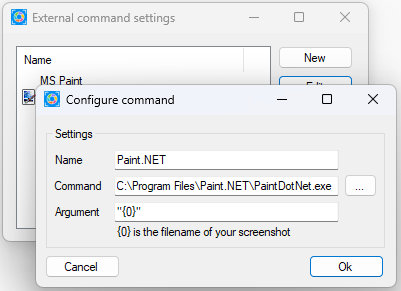
2, In the External Command Settings window, click New.
3, In the Configure Command window, enter a name, the command, and any required arguments.
4, Click OK to close both windows.
5, Restart the app. After rebooting, the newly added external program will appear in the destination list.
E-mail Support
If you have any further questions or feed-backs about the app, please feel free to reach out to us by email. We are here to listen and help.