How to connect ADB (Android Debug Bridge) to WSA?
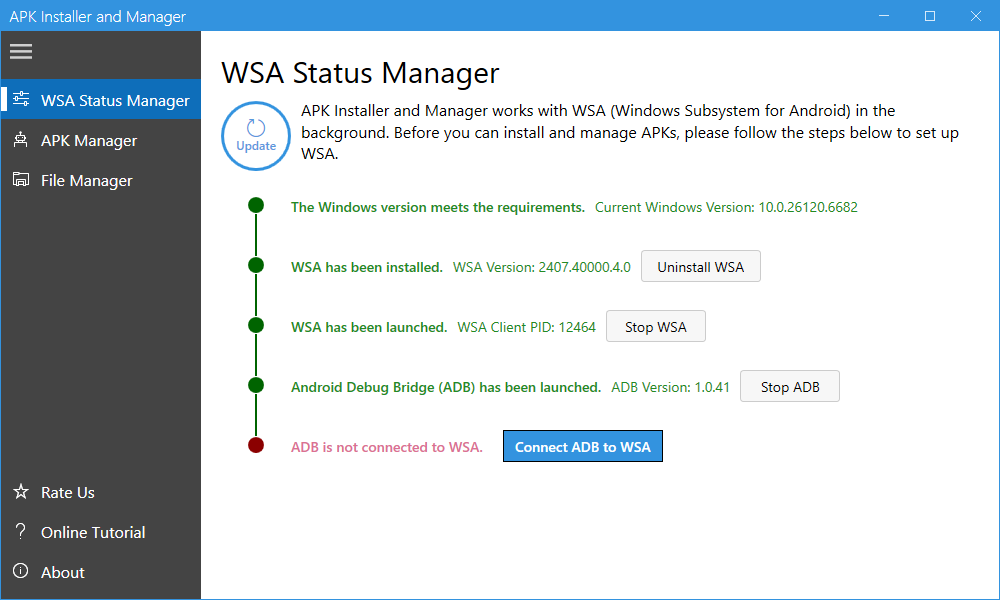
Before you can successfully connect ADB to WSA, make sure that:
1, WSA is running. If it is not running, click the “Start WSA” button to launch it.
2, ADB (Android Debug Bridge) is running. If ADB is not running, click the “Start ADB” button to start it. When prompted by Windows Security to allow public and private networks access for ADB.exe, click “Allow”.
Once both are running, simply click the “Connect ADB to WSA” button to establish the connection.
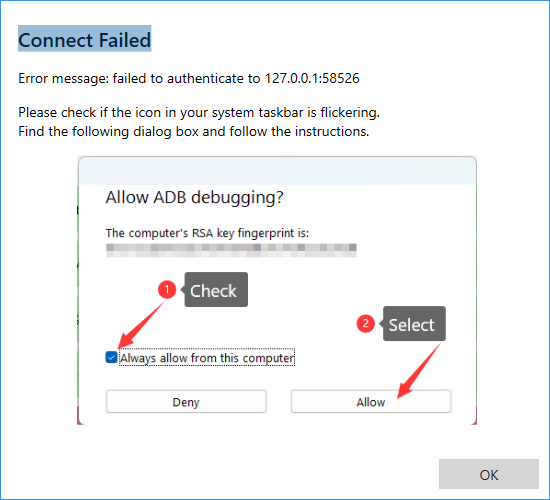
If you encounter the error “Connect Failed. Error message: failed to authenticate to 127.0.0.1:5826”, check whether the icon in your system taskbar is flickering. Locate the flickering window and click the “Allow” button.